Managing Several Abacus Groups Without Mixing Up Homework
When a teacher has one group, almost everything can be kept in memory. Who is learning Small Friends. Who has already moved to Big Friends. Who needs lower speed. Who missed a lesson. Who received additional workbook pages. Even homework can often be remembered without any system.
Then the second group appears. Then the third. Different teaching days. Morning classes. Evening classes. Beginners. Advanced students.
And gradually, the teacher starts asking:
“Did I already assign this to this group?”
“Have they learned this topic yet?”
“Was this student supposed to revise the old topic or move forward?”
The problem is not poor organisation. Several groups — or batches, as many academies call them — simply create a different level of complexity. A system that worked perfectly for five students may stop working for fifty.
Managing several abacus groups becomes easier when teachers separate the common group curriculum from individual student practice. Clear group structure, reusable assignments, personalised practice settings and progress tracking can reduce repetitive administrative work and allow teachers to support more students without losing control of learning quality.
Groups rarely stay uniform
At the beginning, it is easy to think:
“This is one level.”
But after several months, differences appear inside almost every group. One child practises regularly. Another missed two weeks. A third calculates very quickly but makes too many mistakes. A fourth is slower but extremely accurate. A fifth is ready for the next topic. A sixth needs to return to an older weakness.
Organisationally, they are still one group. Educationally, they are gradually becoming different learners — the tension we discuss in group vs individual lessons.
The more groups you have, the more dangerous “same homework for everyone” becomes
The easiest approach is:
“Group A — pages 20–24.”
“Group B — pages 15–18.”
This is simple. But it is not always effective. Even inside Group A, one student may need more repetition; another — higher speed; another — mixed practice; another — revision of an older topic.
The group can follow one common learning path. The homework does not always need to be identical.
Task 1: Name groups clearly
This sounds almost too simple, but it makes a real difference. If your groups are called Monday 4 PM, Monday 5 PM, Tuesday 4 PM, that may work at first. After several months, the names may no longer tell you enough. A clearer system might be:
Or use your own academy naming system. The important thing is that when the teacher opens the group list, they immediately understand who is in the group and what stage they are at.
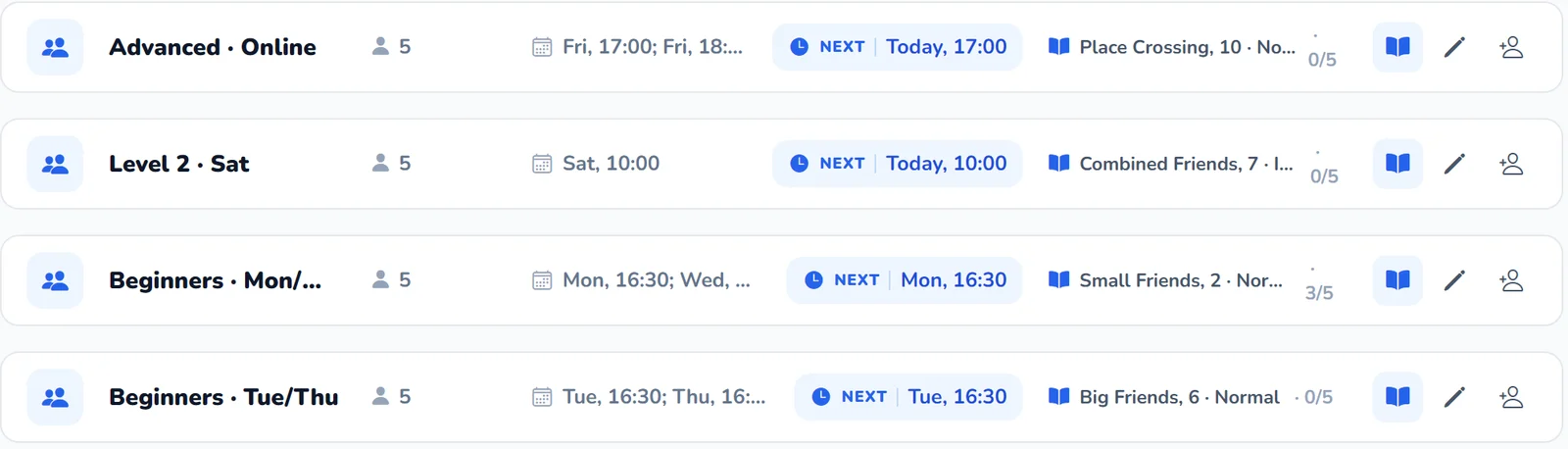
Group names should help teachers work
If every class is simply called Group 1, Group 2, Group 3, Group 4, the teacher may need to open each one repeatedly just to remember who is there.
A good name saves a few seconds. But those seconds are repeated hundreds of times.
Task 2: Separate the group topic from the individual student task
This is one of the most important principles. Suppose the group is learning Big Friend +8. That is the common learning path. But one child may receive basic +8 practice. Another: +8 at a higher speed. A third: +8 inside mixed practice. A fourth: more revision of an older weak topic plus some +8 practice.
So: one group topic does not require one identical homework assignment.
This allows teachers to keep the advantages of group learning while still responding to individual needs.
| One group — different practice · Big Friend +8 | |
|---|---|
| Student A | Basic practice |
| Student B | Higher speed |
| Student C | Mixed practice |
| Student D | Weak topic review + new topic |
Same lesson. Different homework.
Do not turn one group into ten completely different curricula
There is an opposite mistake too. A teacher wants to personalise everything so much that every child effectively receives a completely separate program. If there are ten students, the teacher suddenly manages ten independent learning paths. That quickly becomes unmanageable.
The group should keep a shared educational framework. Individualisation is usually more practical through:
- practice volume;
- speed;
- digit length;
- chain length;
- frequency of weak topics;
- additional exercises.
Not by rebuilding the entire curriculum for every child.
Shared curriculum + individual practice is often the best balance
For example: during the lesson, the whole group learns the same new topic. At home, the strongest child receives a more difficult version; the average child receives the standard version; a weaker child receives more basic repetition. At the next lesson, everyone returns to the common group topic.
This keeps the group together without forcing every child into exactly the same workload.
Task 3: Stop rebuilding homework from zero every week
If every week the teacher manually recreates topic, volume, speed, digit length, workbook pages and additional materials, several groups quickly create a large amount of repetitive work.
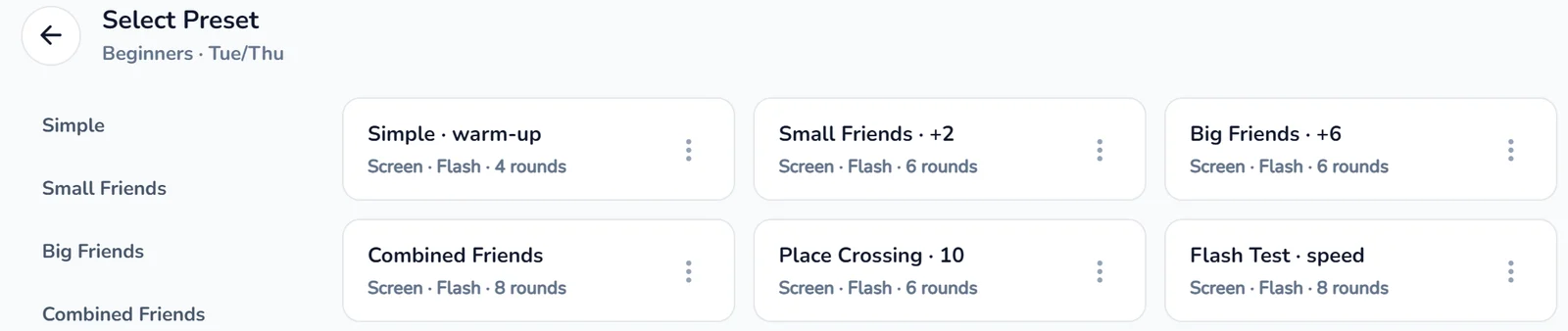
Reusable templates can help. For example:
A template does not mean every student receives the same task. It is simply a starting point.
Templates reduce routine work but do not replace teaching decisions
The teacher can start from an existing structure and adjust speed, volume, topic, digit length and chain length. Instead of recreating everything, the teacher modifies what is already there.
With several groups, this can save substantial time.
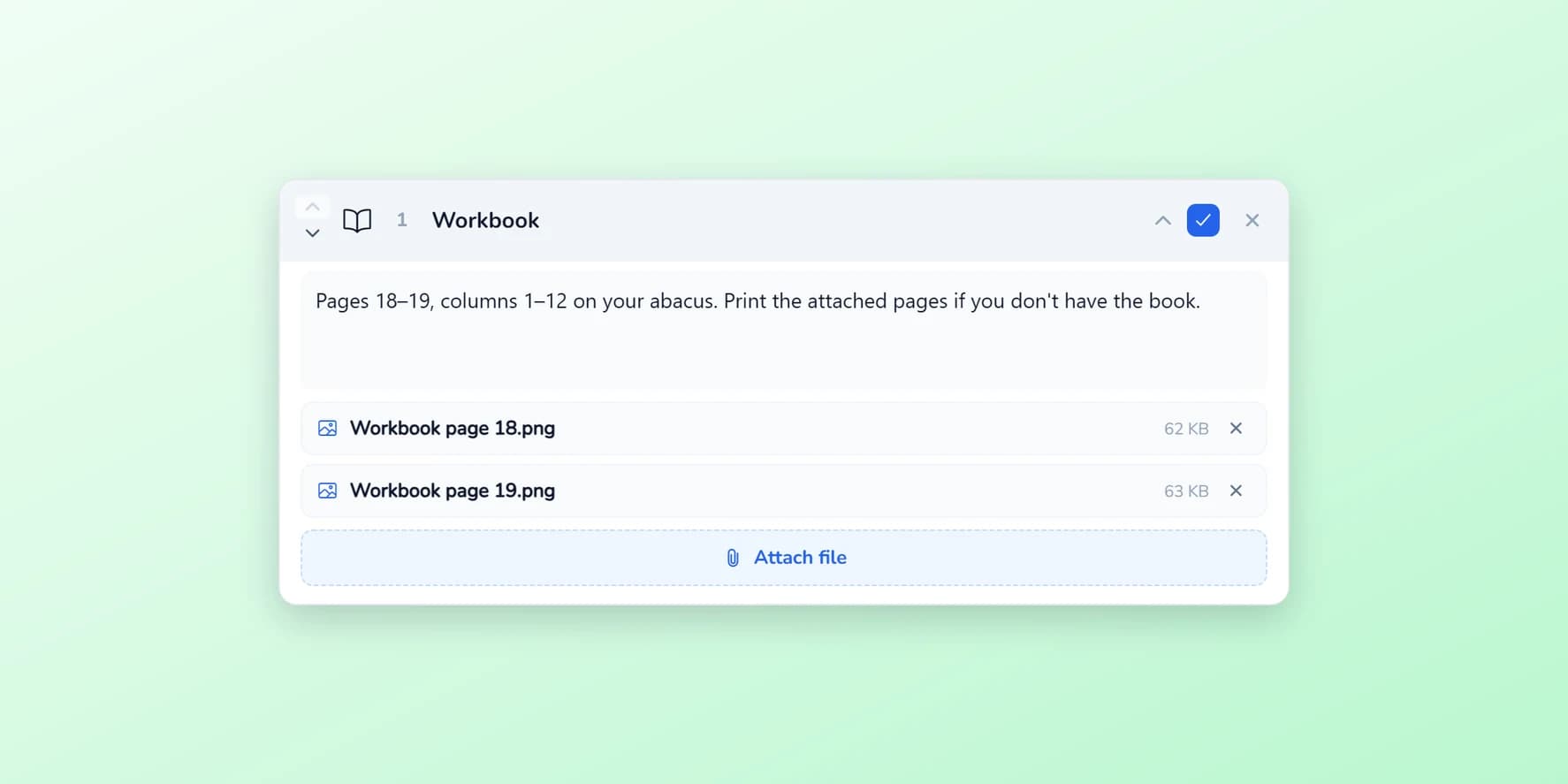
In Amavit, any assignment can be kept with Save preset and later started from My Presets — then adjusted for the group or the student before it is assigned. Presets can be renamed and cloned.
Task 4: Check the assignment before sending it
With several groups, one of the easiest mistakes is also one of the most annoying: sending the wrong assignment to the wrong group. For example:
- an advanced exercise goes to beginners;
- a new topic goes to a group that has not learned it yet;
- last week's homework is accidentally repeated.
A short pre-assignment check helps:
- Which group?
- Which topic?
- Which speed?
- Which digit length?
- What volume?
- Are the correct materials attached?
A few seconds of checking may prevent twenty parent messages later.
Use clear assignment names
Several groups may be working on Small Friends at the same time. But one group is doing isolated practice. Another: mixed practice. Another: higher-speed practice.
If the assignment is named only Small Friends, it is easy to make a mistake. Clearer names help:
The context becomes visible immediately.
Task 5: Review completion by group first
If the teacher opens every student profile individually each evening, the system becomes manual again. With several groups, the better logic is:
group first → exceptions second.
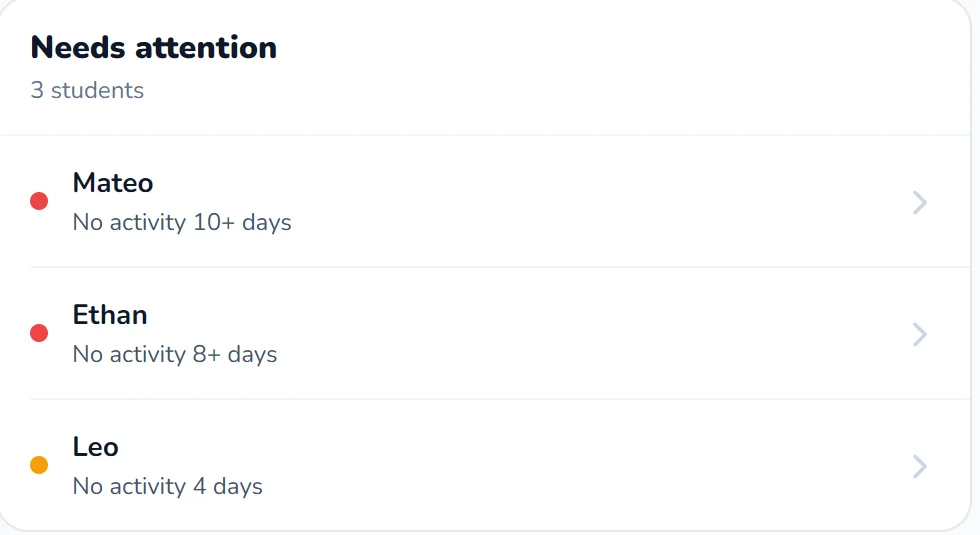
First see who completed the practice, who did not, and where obvious problems appeared. Then open the students who need attention. Not fifty students one by one.
- All students
- Completion overview
- Warning signals
- Students needing attention
- Teacher intervention
Group first → exceptions second.
Teachers do not need to analyse every child deeply every day
If a child practises regularly, has stable accuracy and shows no new warning signs, there may be no reason to deeply review every session.
Teacher attention is more valuable where something changed:
- accuracy suddenly dropped;
- homework stopped;
- one mistake keeps repeating;
- speed became unstable;
- an old topic started deteriorating.
The system should help find these exceptions.
Task 6: Distinguish lack of practice from lack of skill
Suppose a child has a poor result. But then you see that they practised only once all week. That is a very different problem from: the child practised every day but repeatedly failed the same rule.
The first situation is about consistency — see how often children should practise. The second is methodological — see why children keep making the same mistakes.
When teachers manage several groups, these two problems can easily be confused if they look only at the final percentage.
Task 7: Keep history, not only this week's result
Today's score has limited meaning without context. Suppose a child gets 88%. Is that good or bad?
If one month ago they had 60% on similar work, that may be excellent progress. If one month ago they had 98% at the same difficulty, something may need attention — see why progress is not always linear.
With several groups, historical trends become increasingly important. Not only “What happened today?” but “Where is this student moving over time?” — the subject of how to measure a child’s progress.
Task 8: Reduce administrative work
This is one of the biggest advantages of a digital platform. As the number of groups grows, teachers do not only teach more. They also accumulate more administration: assignments, messages, files, reminders, result checking, group organisation, repeated explanations and homework tracking.
Without a system, every new student adds not only teaching time, but also more administrative time. A platform can take over part of that repetitive work.
Without a system
Teaching · WhatsApp · files · homework messages · screenshots · reminders · manual tracking
With a platform
Teaching · methodological decisions · exceptions
Less repetitive administration → more teaching capacity.
Less administration means greater teaching capacity
This has an important business effect. If a teacher spends less time on sending the same instructions, searching for old homework, checking who received which file, manually collecting screenshots, remembering assignments and organising group information — they regain time.
That time can be used in two ways. The teacher can give more attention to the students they already have or teach more students without increasing administrative workload at the same rate.
This is an important distinction. A digital platform does not increase a teacher's capacity by making lessons shorter. It increases capacity by reducing the amount of repetitive work around the lesson.
When administration takes less time, teaching capacity increases.
A teacher should spend more time teaching than managing messages
Imagine two teachers with the same number of working hours.
Teacher A spends several hours each week on WhatsApp, files, homework reminders, manual tracking and searching old conversations.
Teacher B uses a structured system that handles part of this workflow. Teacher B has more time available for lessons, feedback, technique correction, new students and teacher development.
Over time, that difference becomes significant.
A platform can help a teacher work with more students without losing control
This does not mean simply:
“Take as many students as possible.”
Quality still matters. A teacher has a natural teaching capacity. But part of that capacity is often consumed by work that is not actually teaching.
If routine administration is reduced, the teacher can increase the number of students while still maintaining a structured workflow. For an independent teacher or small academy, this can directly improve business economics.
A teacher's capacity should be limited primarily by teaching quality — not by repetitive homework administration.
Task 9: Separate teaching and management roles as the academy grows
When a centre grows, another issue appears. One person may be teaching, assigning homework, replying to parents, creating groups, managing schedules and handling administrative questions. At some point, that becomes too much.
With several teachers, roles can gradually become clearer. Teachers focus on learning, topics, practice and results. Managers focus more on organisation, schedules, groups, communication and administration.
A structured platform helps make that division easier.
Teachers should see what they need, not the entire administration
A centre-management system should not force a teacher to navigate through administrative sections every time they want to review student practice. The teacher should quickly reach their groups, their students, assignments and results.
The shorter the path, the fewer mistakes and the less unnecessary work.
Task 10: Keep a common standard across the academy
When several teachers work in one centre, another type of inconsistency can appear. One teacher assigns a lot of homework. Another almost none. A third changes the format every week.
Some teacher individuality is normal. But core principles should be consistent. For example:
- how often practice is expected;
- how new topics are assigned;
- how low accuracy is handled;
- when speed increases;
- how workbook pages are used;
- how parents are informed.
This becomes especially important when a student moves from one teacher to another.
Standardisation does not mean identical homework
These are different ideas. An academy can have common principles while still personalising student practice.
For example, every teacher may follow: accuracy before speed. But each child's actual speed can be different. Every teacher may use: regular mixed review. But each student's weak topics are different.
The standard defines the methodology. It does not require identical tasks.
Task 11: Build a simple weekly routine
Several groups become easier to manage when the teacher follows a predictable rhythm. For example:
- After the lesson — assign homework.
- Midweek — quickly check whether students have started.
- Before the next lesson — review students who show problems.
- At the next lesson — adjust practice or difficulty.
This is much more efficient than opening the platform randomly throughout the day and trying to review everything.
Example of a weekly workflow
Imagine a teacher has four groups.
| Monday | Group A and Group B. Homework is assigned after each lesson. |
|---|---|
| Tuesday | Group C. |
| Wednesday | Quick check of A/B/C: who has started? |
| Thursday | Group D. |
| Friday | Review exceptions. |
By the weekend, the teacher already knows who needs help, who is falling behind and who can move faster. Monitoring becomes part of the schedule instead of another constant interruption.
Digital systems should reduce monitoring, not create more of it
If a teacher has to stare at a dashboard all day, something is wrong. The goal is not constant surveillance. The goal is: quickly identify where teacher attention is needed. Then return to teaching.
How to handle missed lessons
With several groups, someone is always absent. If a child misses a lesson, it may be a mistake to automatically assign the same homework as everyone else. The child may not know the new topic. First ask:
- What did they miss?
- Should they receive additional explanation?
- Should they continue revising the previous topic?
- Do they need a short individual correction?
Automatic “everyone gets the same homework” works particularly poorly here.
New students need the same care
When a student joins from another school, do not place them into a group only by age or the last topic they studied.
Strong students can get lost inside a group too
Teachers often focus on children who are falling behind. But there is another problem. A strong student gets 100%, finds everything easy, becomes bored and waits for the group.
If the teacher looks only at the average level, this child may stop progressing. Instead of immediately moving them to another class, the teacher can increase speed, digit length, chain length or mixed-practice complexity.
This can help groups stay together longer
A group is not only a learning level. It also provides friends, a familiar teacher, motivation and social connection.
If small differences can be managed through personalised practice, the academy does not need to constantly split students into new groups.
How Amavit helps manage several groups
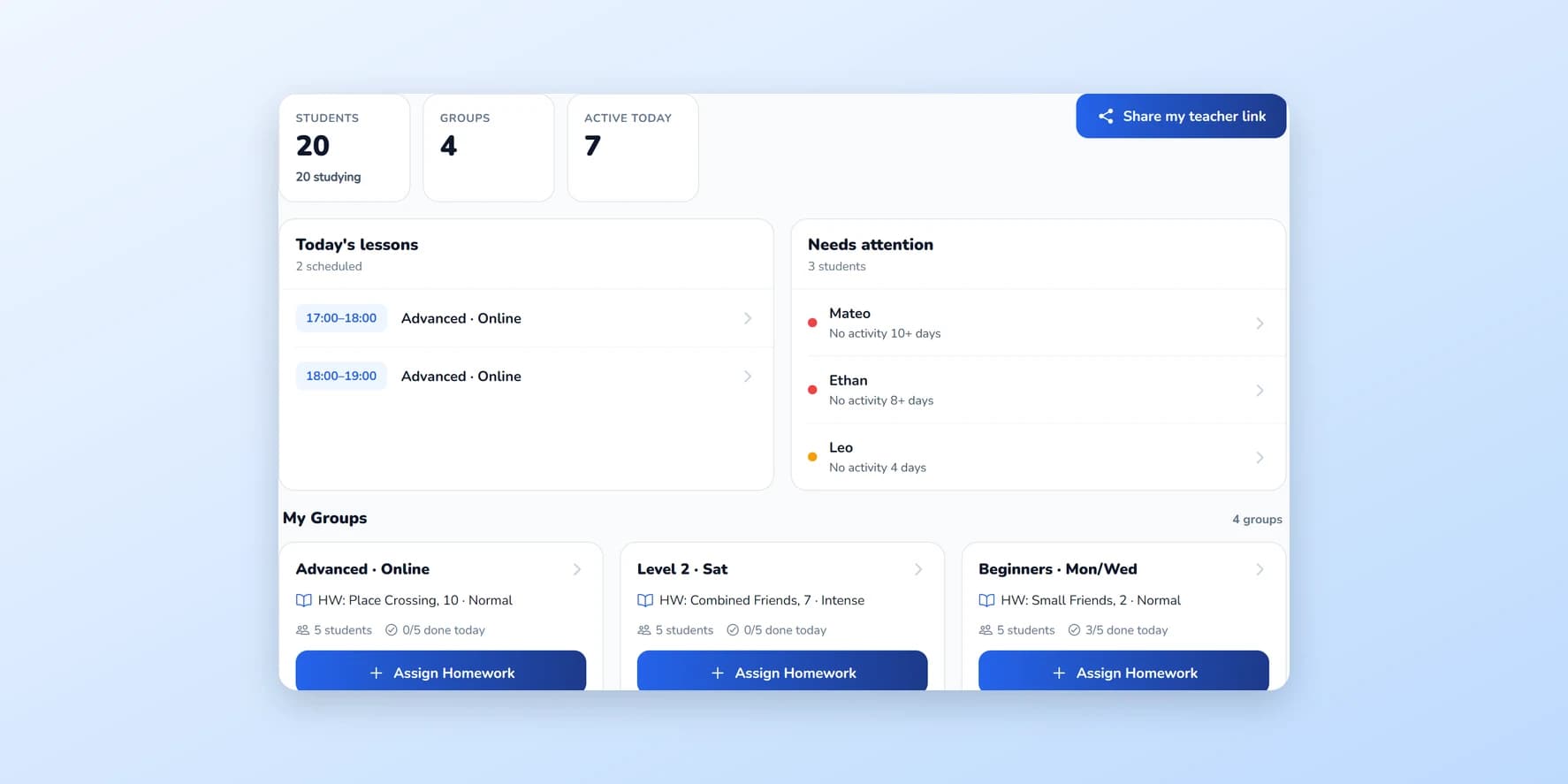
The idea is simple. The teacher does not work with one chaotic list of students. They work with:
- groups;
- individual students inside those groups;
- homework assignments;
- individual practice settings;
- results;
- practice history.
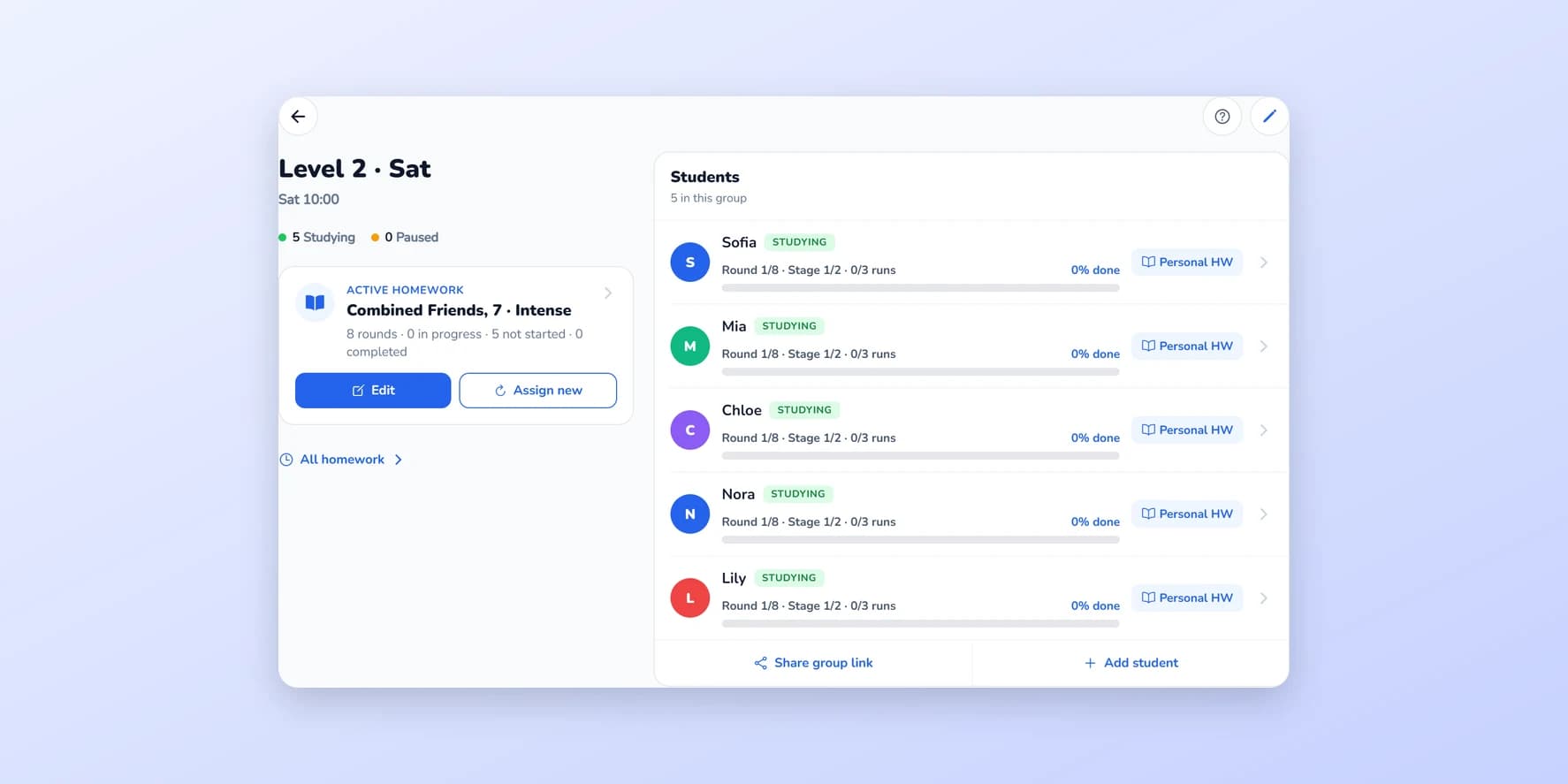
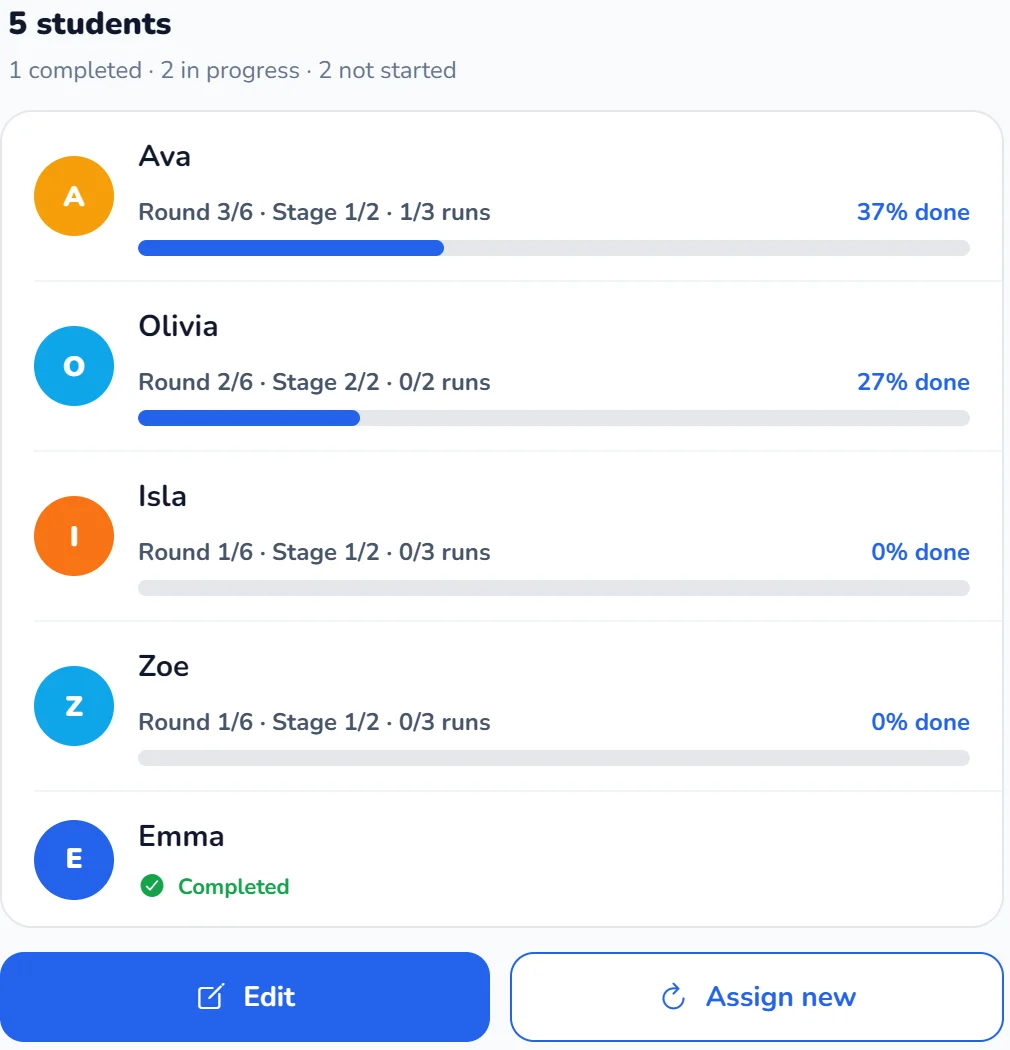
The group can keep a shared learning path. When necessary, the teacher adjusts the workload for a particular student: in Amavit, a student can receive personal homework with their own settings, and they see it instead of the group assignment. On the group screen, the teacher sees how many students have completed the group homework, how many are in progress and how many have not started.
The same lesson does not require the same homework
This may be the most important principle in the article. A teacher can explain the same topic to the whole group. But each child may need a different amount or level of practice afterwards.
Group teaching and individualisation do not contradict each other.
The same lesson does not require the same homework.
Automation should remove routine, not methodology
The platform can help with assignment organisation, practice delivery, group structure, result collection, practice history, attached materials and repetitive workflows.
But it should not make methodological decisions instead of the teacher. The teacher still decides what the child needs, when to increase difficulty, when to slow down, when to repeat and when to move forward.
The platform handles more of the repetitive administration around those decisions.
Automate routine work, not teaching decisions.
As an academy grows, structure becomes a business advantage
When one teacher has ten students, the absence of a system may not be noticeable. When there are two teachers, four groups, fifty students, seventy students — administrative chaos begins to cost time. Eventually, it costs money.
Because it creates mistakes, missed assignments, parent frustration, students receiving the wrong practice and unnecessary repetitive work.
A structured workflow allows the academy to grow without every new student creating the same amount of additional administration.
- 1 group clear workflow
- 3 groups reusable templates
- 5 groups manage by exceptions
- Several teachers common academy standards
Structure should grow before chaos does.
The main conclusion
Several groups cannot be managed effectively by memory alone. As the number of students grows, it becomes increasingly important to separate the shared learning path of the group from the individual home practice of each child.
A strong workflow includes:
- clear group names;
- a shared topic;
- individual practice parameters;
- reusable templates;
- a quick pre-assignment check;
- completion monitoring;
- attention to exceptions;
- a predictable weekly routine.
And there is an additional business benefit: the less repetitive administration a teacher has to do manually, the more teaching capacity becomes available.
That capacity can be used to support existing students better or teach more students without increasing administrative work at the same rate.
The goal is not to automate teaching. The goal is to automate enough routine work that the teacher can spend more time doing what only a teacher can do.
A group can learn together without every student receiving identical practice. And a growing academy should not become more chaotic simply because it serves more children.
If your homework still lives in chat messages, start with moving abacus homework beyond WhatsApp; if you are new to the platform, begin with your first week with Amavit.
Frequently asked questions
How can an abacus teacher manage several groups efficiently?
Use clear group structures, keep a shared curriculum, personalise only the practice parameters that need to differ, and review students by exceptions rather than checking every student manually every day.
Should every student in the same abacus group receive the same homework?
Not necessarily. Students can learn the same lesson but receive different practice volume, speed, digit length, chain length or revision according to their current needs.
Can a digital platform help an abacus teacher teach more students?
It can reduce repetitive administrative work such as organising assignments, materials, results and homework tracking. This can free more of the teacher's working time for teaching and allow greater student capacity without increasing administration at the same rate.
Does automation replace the teacher's methodological decisions?
No. The teacher still decides what each student needs, when to increase difficulty and when to revise. The platform mainly helps organise and deliver the workflow.
How should teachers monitor several groups?
A useful approach is to review the group first, identify students with warning signals or missing practice, and then focus detailed attention on those exceptions.
Should strong students move to another group immediately?
Not always. Sometimes they can remain in the same group while receiving higher speed, longer chains, greater digit length or more complex mixed practice.
What happens when an academy grows to several teachers?
It becomes more important to define common standards for homework, progression, communication and practice while still allowing teachers to personalise work for individual students.
Free for teachers